Showing posts with label adf model. Show all posts

Wednesday, January 3, 2018

ADF performance tuning: Whitepaper published on the ADF Performance Monitor

The ADF Performance Monitor is an application performance management tool (APM) tool that really understands Oracle ADF applications. Web applications often contain frustrating blind spots and mysterious, recurring problems that are often difficult to identify, diagnose, and fix. The ADF Performance Monitor helps enterprises by delivering insight into real end-user experiences. It helps development, QA teams and administrators detect, analyze and resolve common and less common issues in response times and resource usage of ADF applications.


This blog publishes a new whitepaper that gives detailed information about the architecture and implementation of the ADF Performance Monitor.

History


The first version of the ADF Performance Monitor was created by Frank Houweling and released in 2009. This was first an ADF 10g version; this version consisted of printing performance metrics in JDevelopers console log only (what methods, operations and queries were executed, when and how often). The urgent need of performance visibility came back every time in somewhat all Oracle ADF projects; nearly all ADF applications had performance problems in some way and extreme difficulty in identifying these bottlenecks.


One year later (2010) the second version was released including saving metrics to the database. In 2011 a dashboard application was added that visually reported the performance metrics saved in the database. Last years the monitor has been extensively improved and extended with many new and advanced features.

Over last years the ADF Performance Monitor has been implemented in more than 50 Oracle ADF business production applications – in more than 25 countries in the world; for example in the Netherlands, Germany, Belgium, United Kingdom, France, Spain, Canada, United States, Switzerland, Austria, Romania, Poland, Libanon, Sultanate of Oman, India, China, Australia, Cuba, Mexico, e.g.

New whitepaper published

Whitepaper ADF Performance Monitor - this document gives more information about the architecture and implementation of the ADF Performance Monitor.


Content of the whitepaper:

  • Executive overview
  • Introduction
  • Oracle ADF applications and performance
  • ADF Performance Monitor overview
  • Use in JDeveloper
  • Use in test and production environment
  • Dashboard reporting application
  • Summary and details HTTP response times
  • ADF framework call stack
  • Warnings and suggested solutions
  • Worst performing executions in ADF BC and model layer
  • Error stacktraces
  • JVM performance
  • Product architecture
  • Configuration
  • Turn on/off at all times
  • Prerequisites
  • Monitored Events

Functionality

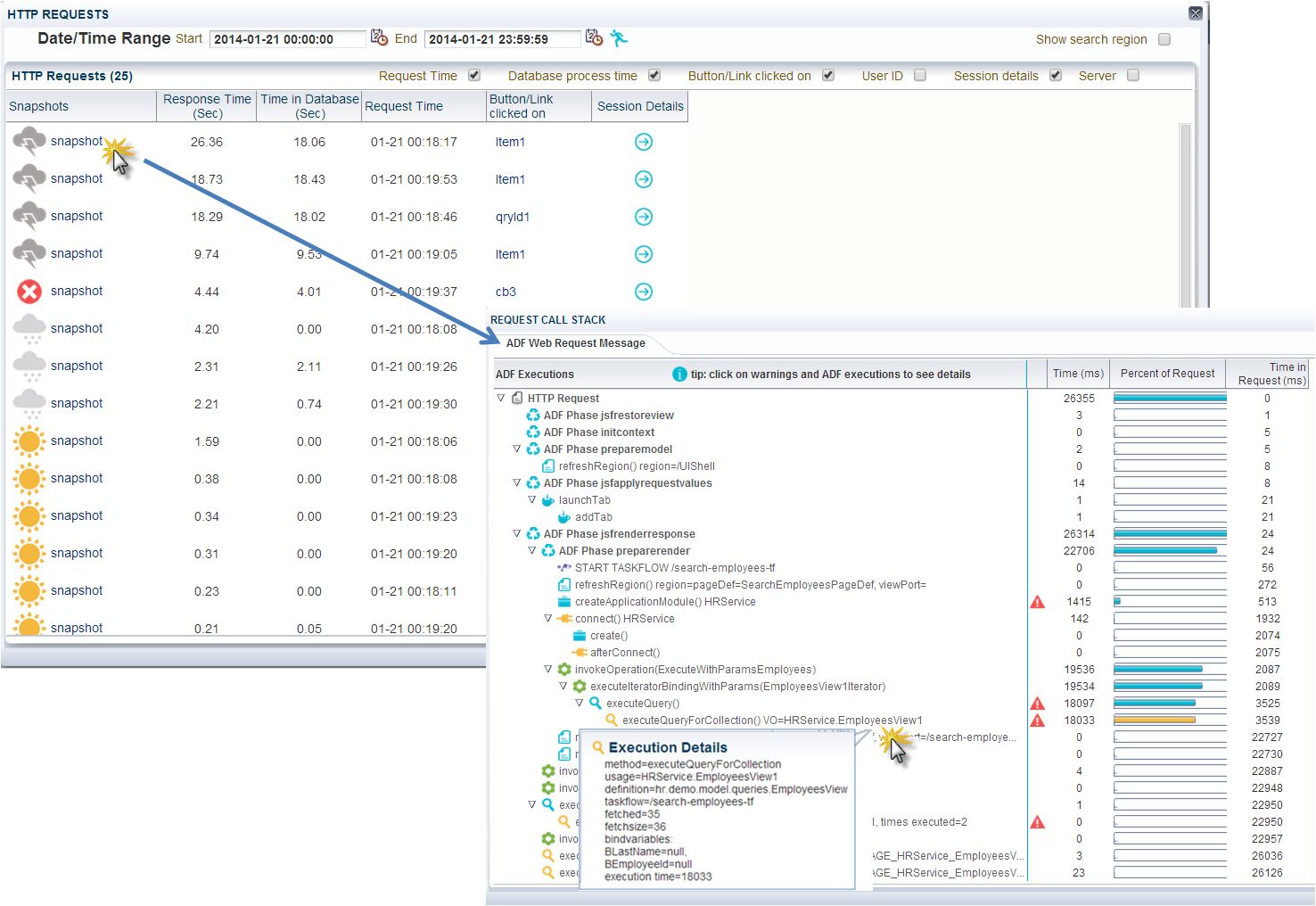
In development, test and production environments, the ADF Performance Monitor provides similar functionality as the callstacks of the Oracle ODL Analyzer (by ADF request). The Oracle ODL Analyzer can be useful in the development stage, but can’t be used in test en product environments because of the amount of logging generated and the significant performance overhead. The ADF Performance Monitor records the performance with a very low overhead (less than 4%, caused by the detailed collection of performance metrics). An example of a callstack in the ADF Performance Monitor is shown in the image below. In this case the bottleneck is a slow ViewObject query of 18033 milliseconds (with usagename HRService.EmployeesView1):


In addition to that, the monitor reports overviews of the worst performing ADF Business Components (shown in the image below), BindingContainer and webservice executions and the possibility to drill down. Extensive help is available in the monitor on how to interpret the metrics. Also JVM metrics and application errors are reported. SLA monitoring (load and HTTP request response times) is possible. Because of the low performance overhead, it is safe to use the ADF Performance Monitor in production environments. The metrics collection can be dynamically turned on and off (at runtime) at all times. When the monitor is turned off there is no performance overhead because the metrics classes are not active. More detailed information is available in the whitepaper published in this blog.


With the ADF Performance Monitor, development, QA and operation teams get insight into what is happening inside their ADF application throughout the whole application lifecycle. With this insight they can circumvent frequent performance problems, use best practices and deliver a responsive and scalable ADF application.


More information

More information is available on www.adfpm.com.

Sunday, March 12, 2017

ADF Runtime Diagnostics: Instrumenting your ADF Application - Part 1

In a series of blog articles I will show how you can instrument your ADF Application key actions. Instrumenting gives visibility and insight of what is happening inside the ADF application and in the ADF framework (what methods and queries are executed, when and how often). These runtime diagnostics can be very effective in identifying and solving performance issues. This enables developers to diagnose and solve performance problems at an early stage and to build an efficient, responsive ADF application before it goes into production. In this blog I will discuss instrumenting the ADF BC ViewObject. In part 2 the ApplicationModuleImpl is discussed.


ADF BC framework extension classes

You can instrument your ADF application with the use of ADF BC framework extension classes and overriding specific methods to measure important key actions inside the ADF framework. You can use your project base classes or create a dedicated metrics package with extension classes for performance analysis and tuning. For an ADF BC ViewObject you could create a metrics ViewObject (for example called MetricsViewObject) that extends from oracle.jbo.server.ViewObjectImpl. Your project base class can extend from this MetricsViewObject:


Monitor slow queries

You can measure exactly - like a stopwatch - the execution time of a Java method by retrieving the current nano time just before and immediately after the method execution by calling System.nanoTime(). System.currentTimeMillis() can be a few milliseconds inaccurate. See the API doc of System.nanoTime() and System.currentTimeMillis().

long startTime = System.nanoTime(); 
//method being measured ...
long estimatedTime = System.nanoTime() - startTime;

You can look at the ViewObjectImpl API doc for important methods to monitor.

A quick and simple way to monitor executed database queries in ADF is to override the ViewObject method executeQueryForCollection() in your metrics base class. In this way you can monitor which ViewObject queries are executed, their execution time, when and how often. You might detect redundant or unexpected ViewObject queries. With this method you can monitor all queries including queries from ViewAccessors, programmatic ViewObjects, detail queries from ViewLinks, e.g. ).


A ViewObject usage name that contains '_LOCAL_VIEW_USAGE' is a generated ViewAccessor name and is also just a ViewObject query. In JDevelopers console log:


The overriden executeQueryForCollection() method of the ADF Performance Monitor is shown in the image below. The monitor only measures when the monitor is turned on. It has a start-point, and an endpoint in a finally block:


The metrics are collected in a separate object MetricsVoExecution. Extra runtime metrics are collected like bind variable name and values, ViewObject definition name, fetched rows, e.g. to make the metrics even more useful. The execution time is measured in the superclass call super().


Monitor slow select count query

Frequently 'SELECT COUNT (1)' queries are executed by the ADF framework to count the number of rows that would be returned if the View Object is executed with the current query (mainly for tables and trees). This query could be a potential bottleneck if it takes very long to execute, and for this reason the method getQueryHitCount() is useful to monitor:


Monitor passivating and activating ViewObject transients

In the same way you can override the activateTransients() and passivateTransients() method. activateTransients() restores attribute values from a ViewObject (if there are transient attributes passivated) and passivateTransients() stores attribute values. Both methods can potentially take a lot of time if the Passivate State - Including All Transient Values checkbox is checked at the ViewObject tuning section:


Our performance logging in JDevelopers console log can look like this (I put a delay in the query of the EmployeesView ViewObject of 15 seconds) looks like this:


You might want to look at the ViewObject API to override other interesting methods as well. You can consider to only log metrics when the execution time passes a configurable threshold.


Monitor fetched rows from the database

In my previous about detecting a high ADF BC memory consumption I explained how you can instrument and measure how many rows are fetched from the database, and how many ViewObject rows are created and cached. The most important method to override is createRowFromResultSet() and counting them in the MetricsViewObjectImpl or BaseViewObjectImpl. Reset the counter before a query is executed (again).


A high load can now be detected in JDevelopers console log. You might want to not log every single row that is fetched but only when you detect a high load.


ADF Performance Monitor

The ADF Performance Monitor uses (amongst others) the extension points and methods described in this blog to measure and record performance. It collects not only execution time but many additional metrics like  bind variable name and values, ViewObject definition name, fetched rows, time spent fetching database rows, e.g. . For every HTTP request a so called 'ADF call stack' is printed. These are the methods that we have overridden in our metrics class and other extension points in the ADF framework  (in the next parts I will discuss many of them). A call stack provides visibility into which ADF methods caused other methods to be executed, organized by the sequence of their execution.  A complete breakdown of the ADF request processing, including all ADF method executions, along with elapsed times is printed, organized by lifecycle phase. ADF developers can switch the metrics logging on and off with the standard ADFLogger of Oracle. The logging of the ADF Performance Monitor in JDeveloper looks like this (for use in a development environment):


Monitoring in production

The callstacks printed in JDeveloper are also available as runtime diagnostics in a production environment. In the image below an example is shown of a long running ViewObject query (method executeQueryForCollection() ) of 18033 milliseconds (usage name of HRService.EmployeesView1):


A callstack with an example of  a long running activateTransients() and passivateTransients()  - of HRService.LocationViewRO:


In test and production environments, the ADF request call stacks of the ADF Performance Monitor provides similar functionality as the runtime diagnostics of the Oracle ODL Analyzer (by ADF request). The Oracle ODL Analyzer can be useful in the development stage, but can’t be used in test en product environments because of the amount of logging generated and the significant performance overhead. The ADF Performance Monitor records the performance with a very low overhead (less than 4%, caused by the detailed collection of performance metrics).

More information about the ADF Performance Monitor is available on www.adfpm.com.

Tuesday, March 1, 2016

ADF Performance Tuning Video (42 min): Improve Your Oracle ADF App Response Time by as Much as 70 Percent

Performance needs to be ingrained in your application - it cannot be added in during the last stages of development. In this video I discuss how you can optimize the performance of your Oracle ADF Fusion application, diagnose and solve typical performance problems, and build an efficient, responsive, scalable ADF application that circumvents common bad practices. This video was originally presented as part of the Oracle ACE Track during the Oracle Technology Network Virtual Developer Day event "Oracle ADF Development - Web, Mobile and Beyond." Last month the video was published on OTNArchBeat (Oracle Architect Community Video Channel).

Important: to watch in high quality at YouTube, select HD quality (720p):


Improve Your Oracle ADF App Response Time by as Much as 70 Percent: 


Content

In the video I discuss several categories of things that are happening frequently too slowly, too often, too little, too soon and too big in ADF applications, and solutions.

Agenda of video session - things that are happening in ADF applications:
  • Too slowly (too slow ViewObject queries, EntitObject DML operations, ApplicationModule pooling passivations and activations)
  • Too often (too many (mini) queries, too many database round-trips, too many HTTP Requests, too many full HTTP Requests, too frequent ApplicationModule passivation & activation, unintentionally left iterators in PageDefs)
  • Too big (too much data in ADF BC memory, too big scope for managed beans, too much HTML to the browser, too much logging on)
  • Too soon (too soon executed taskflows, too soon instantiated ApplicationModules, ADF UI components that are loaded too soon (Immediate versus lazy))
  • Too little (too little Caching, too little JVM Heap size)
We use the ADF Performance Monitor to detect, analyze and help resolve the problems discussed in this video:


Sunday, March 1, 2015

ADF performance tuning: Overview Video published on the ADF Performance Monitor

A good performance is the key to the success of a web application. Oracle ADF applications are no exception to this rule. ADF performance tuning can be time intensive, costly and quite a challenge when performance issues require developers to delve deep into the inner workings of the ADF framework.

The ADF Performance Monitor is an advanced tool specifically designed for measuring, analyzing, tuning, and checking the performance of Oracle ADF applications. The tool can track and collect crucial (production) performance information of the application's runtime ADF components that are not standard provided by Oracle. It helps development, QA, and operation teams to detect, analyze and resolve common and less common issues in response times and resource usage of ADF applications. 

This blog publishes an overview video ADF Performance Monitor (13 min).


The first version of this tool was already released in 2009 (ADF 10g). One year later (2010) the second version (ADF 11g) was released. Last years the monitor has been improved and extended with many new and advanced features. Currently the ADF Performance Monitor has been implemented in more than 15 Oracle ADF applications over the world and has been proven to be very useful. Read the quotes of ADF experts and managers.


Oracle ADF applications and performance

ADF is a powerful, advanced and highly configurable framework that is very performing and scalable if the ADF developer chooses the right combination of parameter settings. However, web applications in general and ADF applications in particular have many pitfalls that can be circumvented by choosing the correct performance configuration parameter settings. In most cases, unfortunately, the default values are not the most optimal values.

Frequently even experienced ADF developers cannot pinpoint why an ADF application is slow. In this case information of what is happening behind the scenes would be very useful in order to get a better understanding of their ADF application.

In development, test and production environments, the ADF Performance Monitor provides similar functionality as the callstacks of the Oracle ODL Analyzer (by ADF request). The Oracle ODL Analyzer can be useful in the development stage, but can’t be used in test en product environments because of the amount of logging generated and the significant performance overhead. The ADF Performance Monitor records the performance with a very low overhead (less than 4%, caused by the detailed collection of performance metrics).


Detecting and Analyzing a High ADF BC Memory Consumption

Recently a new feature was added: a kind of ADF BC memory recorder and analyzer. It detects and warns when too many rows are being fetched (from the database or webservice) and held in ADF BC memory. With this feature you can investigate and address memory over-consumption. Memory over-consumption can lead to very long running JVM garbage collections, a freeze of all current requests or even OutOfMemoryErrors.


Development, QA and operation teams

With the ADF Performance Monitor, development, QA and operation teams get insight into what is happening inside their ADF application throughout the whole application lifecycle. With this insight ADF developers can diagnose and solve performance problems already in an early stage, make better (architecture) decisions and can build more responsive and scalable ADF applications. With the warnings and suggested solutions of the ADF Performance Monitor they can circumvent frequent performance problems, use best practices and deliver a higher quality. This will lead to an application that is more consistent and better to maintain. They can reduce the utilization of infrastructure, hardware and licenses. End-users will be more happy.

A whitepaper on the ADF Performance Monitor is available. More information is available on www.adfpm.com.